![Projul Logo 345PX wide.png]](https://5904352.hs-sites.com/hs-fs/hubfs/Projul%20Logo%20345PX%20wide.png?height=40&name=Projul%20Logo%20345PX%20wide.png)
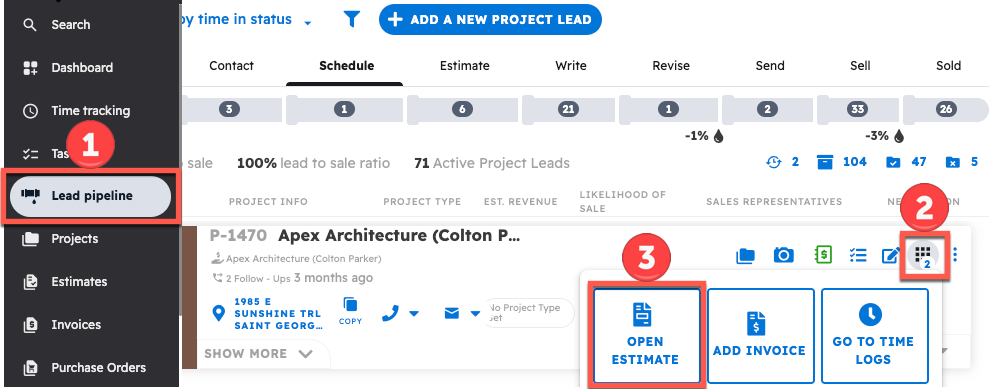
To create an Estimate for a project lead, find your Lead in the Lead Pipeline, click the 9-square menu in the top right corner of the lead card and select "Create Estimate."
Start by navigating to the Lead Pipeline. If you haven't made a lead yet, click on this link to learn how: How do I create a new project lead?
Every Project Lead is able to have one estimate associated with it at a time.
- Find your project lead through the lead pipeline
- Click the 9-square menu icon in the top right corner of the lead card
- Select "Open Estimate"
A new Estimate will open up within the Estimate Editor that is linked with the Lead you are working with. Within this page, you can begin applying any templates and adding/adjusting line items.

To view the various options available to you while editing an estimate, watch this video:
Questions? Let's Chat.
support@projul.com
(844) 776-5853