![Projul Logo 345PX wide.png]](https://5904352.hs-sites.com/hs-fs/hubfs/Projul%20Logo%20345PX%20wide.png?height=40&name=Projul%20Logo%20345PX%20wide.png)
There are two places to change who pays the payment processing fee: the account default settings and individual invoices. The account default can be updated in Settings, and invoice-specific settings can be changed at the bottom of the invoice.
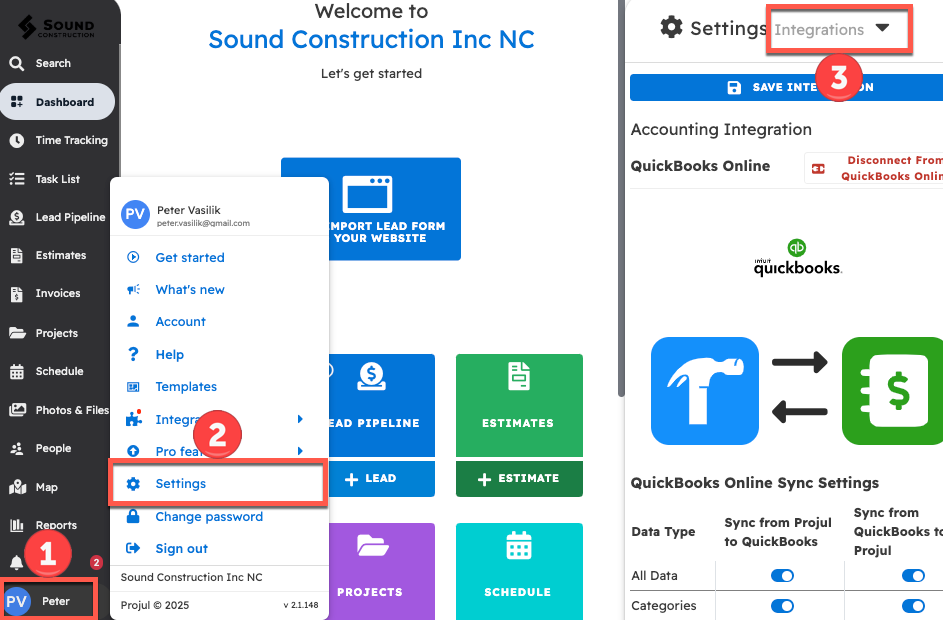
To change the account default for who pays payment processor fees:
- Click on the initials in the bottom left corner
- Open Settings
- Select "Integrations" from the dropdown menu
From the integration settings:
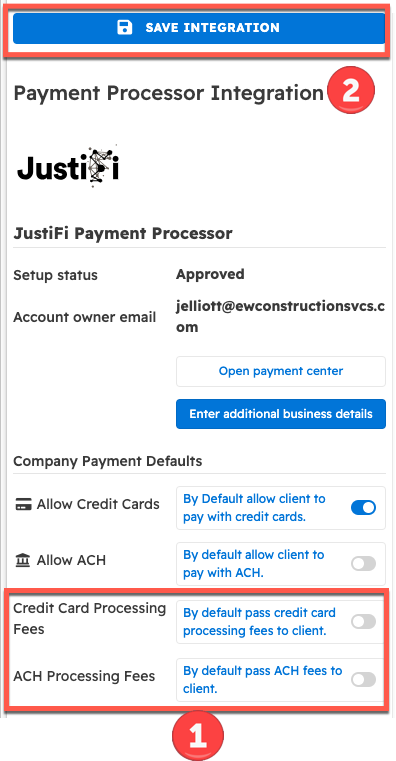
- Scroll down to "Company Payment Default." There are two toggles labeled "By default pass Processing fees to client;" one for credit card fees, and one for ACH payments. If enabled, the account default will pass payment processing fees to clients.
- Save the integration before closing.
Note: Changing this account default will not affect any previously created Invoices. To change a previously created invoice, refer to "Change a Specific Invoice" below.
Change a Specific Invoice:
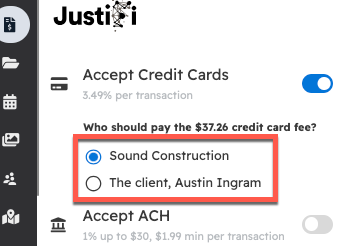
To change who pays the processing fee for a specific invoice, scroll down to the bottom of the invoice to see the toggles for who pays the processing fee.
Note: Changing this invoice payment option will only affect this invoice, and will have no impact on any other invoices.
Questions? Let's Chat.
support@projul.com
(844) 776-5853